


How to Use Google Ads Formula, Even if You’ve Never Tried it Before

Why Every Google Ads Campaign Needs a Formula-Driven Approach
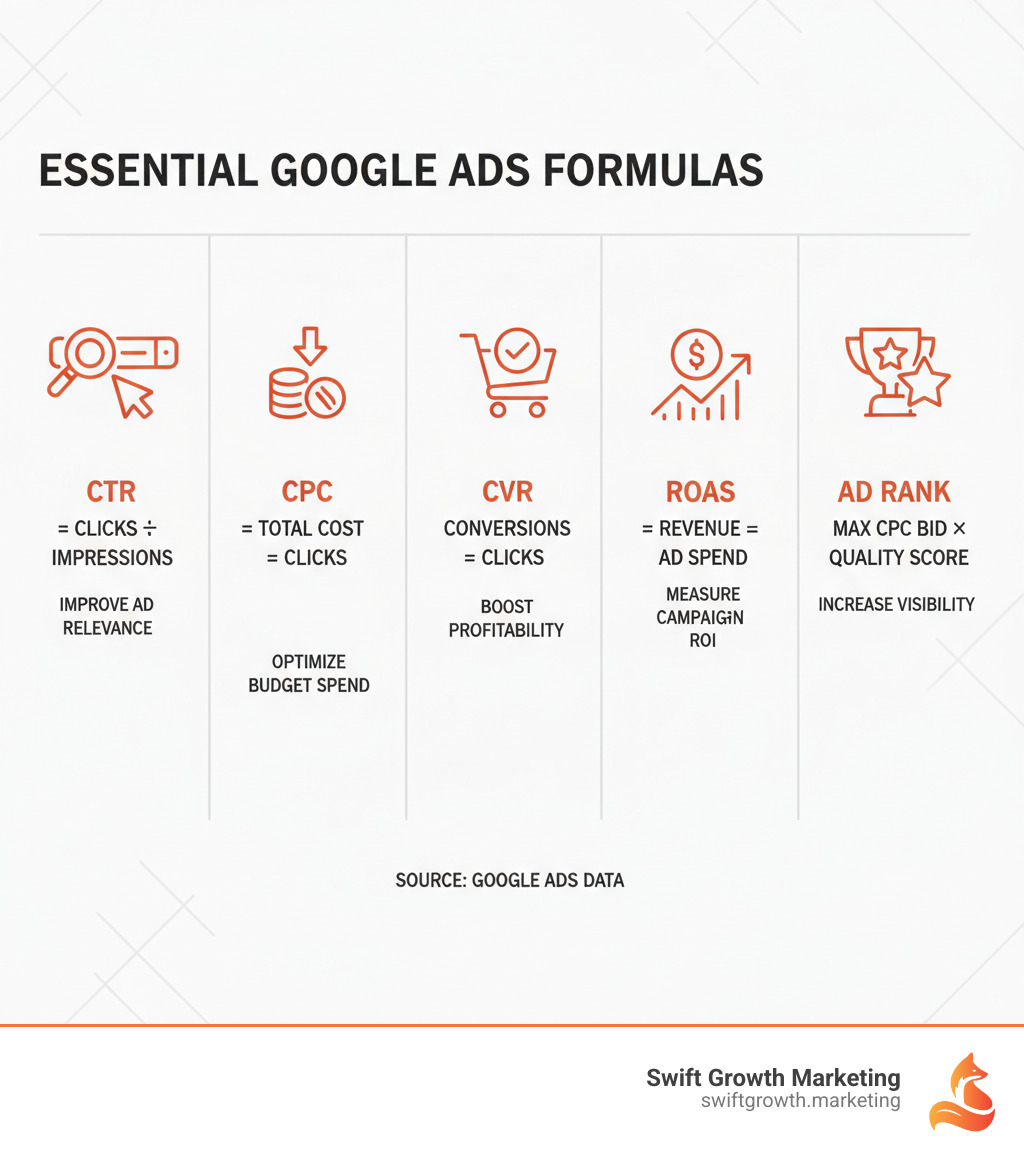
Google ads formula isn’t just a single calculation—it’s a system of mathematical relationships that determine whether your campaigns make money or burn through budget. At its core, you need to understand how these key formulas work together:
- Click-Through Rate (CTR) = Clicks ÷ Impressions
- Cost Per Click (CPC) = Total Cost ÷ Clicks
- Conversion Rate (CVR) = Conversions ÷ Clicks
- Return on Ad Spend (ROAS) = Revenue ÷ Ad Spend
- Ad Rank = Max CPC Bid × Quality Score
These aren’t abstract math problems. They’re the difference between a campaign that generates $10,000 in revenue from $1,000 in ad spend and one that loses money on every click.
Many marketers feel overwhelmed by the numbers, but you don’t need to be a data scientist. You just need to understand which metrics matter for your business goals and how to calculate them.
Position 1 on Google’s search results receives about 2.1% of all clicks compared to roughly 1.4% for position 2. That difference compounds over thousands of searches. The formulas that determine your ad position directly impact how much traffic you get and what we pay for it.
The good news? These calculations are simpler than they look. Once you understand the basic formulas, you can make strategic decisions instead of guessing. You’ll know whether to increase your budget, improve your Quality Score, or adjust your bidding strategy.
I’m Chris Hornak, and I’ve used these formulas to help clients achieve results like a 764% traffic increase. Understanding this framework is essential for data-driven campaign management and real growth.
Let’s break down exactly how these formulas work and how to use them to build campaigns that actually drive growth.
The Building Blocks: Essential Performance Metrics & Formulas
Think of google ads formula metrics as your campaign’s vital signs. These fundamental calculations—CPC, CPA, CTR, and CVR—tell you if your campaigns are healthy or need attention. They are an early warning system to catch problems before they drain your budget, helping you protect your investment and maximize your ROI of paid media. Let’s break them down.
Understanding Your Ad’s Effectiveness with CTR
Your Click-Through Rate (CTR) answers one simple question: Are people interested enough in my ad to click on it?
The CTR formula is straightforward:
CTR = (Clicks / Impressions) × 100
Say your ad shows up 10,000 times and gets 500 clicks. Your CTR is (500 / 10,000) × 100 = 5%. That means 5% of people who saw your ad decided it was worth clicking.
Why does this matter? CTR is your first clue about message-audience fit. A high CTR means your ad copy, headlines, and offer are compelling. As a bonus, Google rewards high-CTR ads with a higher Quality Score, which can lower your cost per click. Crafting great headlines is key, and you can find strategies in The Universal Headline Framework That Works.
Managing Costs with CPC and CPA
Every click costs you money. The question is: Are you paying the right amount?
The CPC (Cost Per Click) formula tells you exactly what each click costs:
CPC = Total Cost / Clicks
Spend $1,000 and get 500 clicks? Your CPC is $1,000 / 500 = $2 per click. Simple enough.
However, your actual CPC isn’t just your bid. It’s determined by the Ad Rank of the advertiser below you and your Quality Score. We’ll cover this later, but the key takeaway is that improving ad quality can reduce what you pay.
Now let’s talk about CPA (Cost Per Acquisition):
CPA = Total Cost / Conversions
This is where things get real. CPA tells you how much you’re spending to get an actual customer or lead—not just a click. If you spend $1,000 and get 10 conversions, your CPA is $100. That’s what each new customer or lead costs you.
CPA is the metric that connects directly to your bottom line. You can have cheap clicks all day long, but if those clicks don’t convert, you’re just burning money. The goal is to keep your CPA low enough that you’re still profitable after accounting for all your other business costs. This is exactly the kind of strategic thinking we explore in 5 Tips to Getting a Better ROI from Your Growth Marketing Budget.
Measuring User Actions with Conversion Rate (CVR)
Getting clicks is great. But what happens after people click? That’s what Conversion Rate tells you.
The CVR formula measures how many clicks turn into actual results:
CVR = (Conversions / Clicks) × 100
If 100 people click your ad and 10 of them convert, your CVR is (10 / 100) × 100 = 10%. One in ten clicks becomes a customer or lead.
Your conversion rate reveals the truth about your landing page. A low CVR suggests a disconnect after the click—perhaps the page doesn’t match the ad, the offer is unclear, or the form is too complex. A strong CVR indicates a seamless user experience from ad to action. This is why we focus on Psychology-Based Landing Page Optimization That Converts, as small page changes can dramatically improve your CVR and bring in more customers from the same ad spend.
The Core Google Ads Formula: Understanding Ad Rank and Quality Score
The biggest wallet doesn’t always win in Google Ads. Small businesses with smart strategies can outrank competitors with ten times their budget by understanding how Ad Rank and Quality Score work. These concepts are the mathematical foundation determining your ad’s visibility and cost. Master this google ads formula, and you can compete with anyone, regardless of budget.

How Ad Rank Determines Your Ad’s Visibility
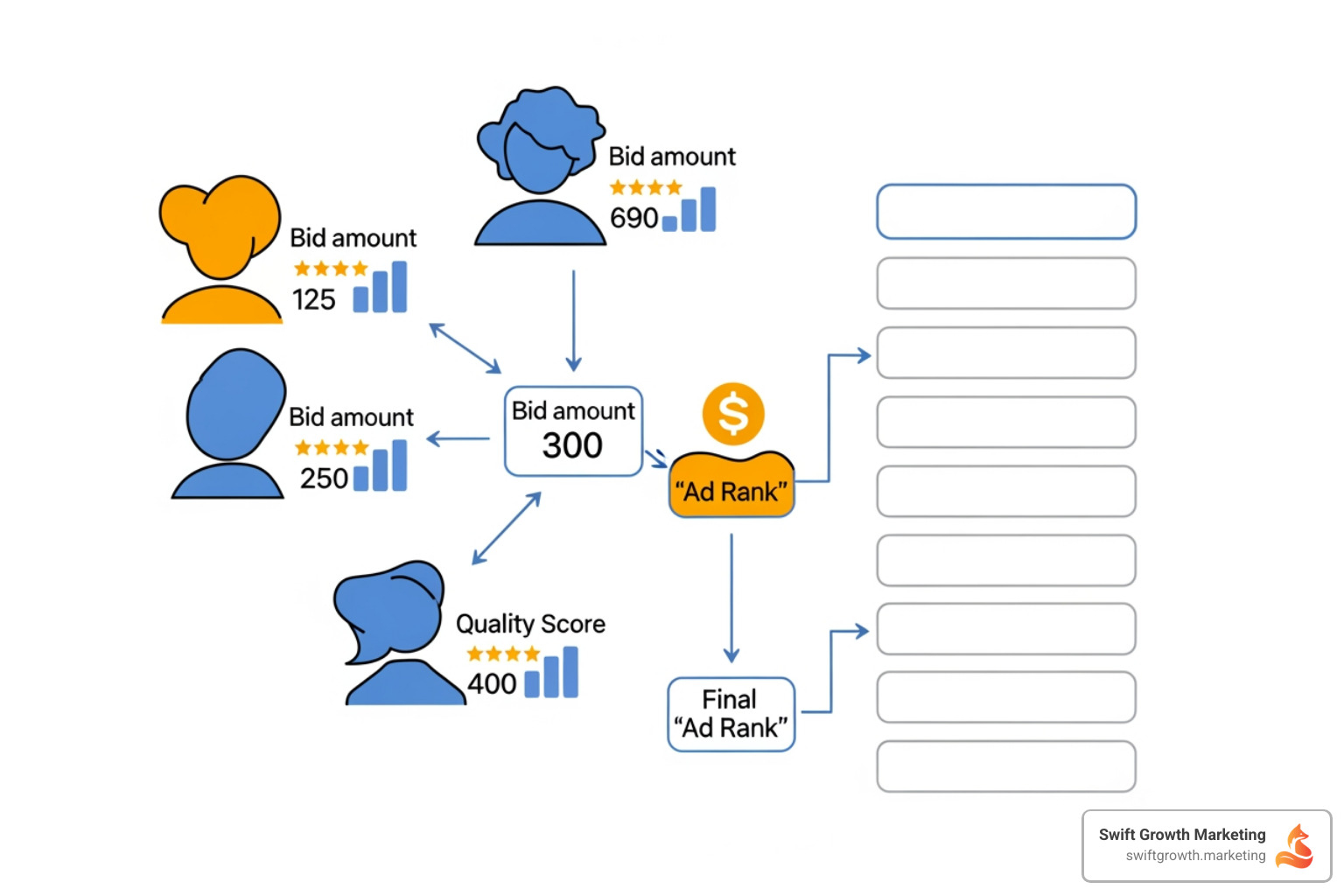
Every time someone searches on Google, an auction happens in milliseconds. But this isn’t a simple “highest bid wins” situation. Google uses Ad Rank to decide which ads show up and in what order.
Ad Rank Formula:
Ad Rank = Max CPC Bid × Quality Score
This simplified version captures the core concept. Your maximum bid gets multiplied by your Quality Score to create your Ad Rank. The advertiser with the highest Ad Rank wins position 1. The second-highest gets position 2. And so on.
Why does this matter so much? Position 1 captures about 2.1% of all clicks, while position 2 only gets roughly 1.4%. That’s a 50% difference in traffic potential. Position 3 drops even further to around 0.9%. These percentages compound over thousands or millions of searches.
This is where it gets interesting: a high Quality Score lets you outrank higher bidders. For example, if a competitor bids $5 with a Quality Score of 4 (Ad Rank = 20), you can bid $3 with a Quality Score of 8 (Ad Rank = 24) and win the top spot while paying less. While the actual formula is more complex, factoring in ad extensions and search context, the principle is the same: bid amount and ad quality both matter.
This is also how Google calculates what you actually pay. Your Actual CPC isn’t your maximum bid—it’s based on the Ad Rank of the advertiser below you, divided by your Quality Score, plus one cent. Better quality means lower costs.
Breaking Down the Quality Score Google Ads Formula
Quality Score is Google’s report card for your ads. It’s a 1-10 rating that measures how relevant and useful your ads, keywords, and landing pages are to the people who see them. A score of 10 is perfect. Most accounts hover between 5 and 7.
This score directly impacts your Ad Rank, controlling your ad position and CPC. Improving your Quality Score from 5 to 8 can cut CPC by 30-40%, getting you the same traffic for a fraction of the cost.
Google evaluates three main components to calculate your Quality Score:
Expected Click-Through Rate (CTR) is the biggest factor. Google predicts how likely your ad is to get clicked when it shows for a specific keyword. If your historical CTR is strong, Google rewards you with a higher score. If people consistently skip your ad, your score drops.
Ad Relevance measures how closely your ad copy matches the keyword that triggered it. If someone searches “blue running shoes” and your ad headline says “Blue Running Shoes on Sale,” that’s highly relevant. If your ad talks about general athletic wear, the relevance score drops.
Landing Page Experience evaluates what happens after the click. Is your landing page relevant to the ad and keyword? Does it load quickly? Is it easy to steer on mobile? Does it provide clear value without being deceptive? Google wants to send searchers to pages that actually help them.
Improving your Quality Score is essential for competitive costs and positions. It requires continuous testing of ad copy, keyword refinement, and landing page optimization. Unlike competitor budgets, you have complete control over your Quality Score. Every improvement compounds over time, giving you better positions at lower costs and allowing small businesses to beat the Goliaths.
Measuring Success: How to Calculate Profitability with ROAS & ROI
Clicks and conversions are great, but profitability is what matters. Understanding Return on Ad Spend (ROAS) and Return on Investment (ROI) is essential for measuring if your campaigns achieve business goals. These formulas tell you if you’re building a sustainable business or just generating vanity metrics. As we know, fast marketing wins happen when you listen to customer data and measure what drives profit.

The Profitability Google Ads Formula: Calculating ROAS and ROI
Let’s break down exactly how to calculate these critical metrics. They’re simpler than they sound, and once we understand them, we can make smarter decisions about where to invest our advertising budget.
Return on Ad Spend (ROAS) tells us how much revenue we generate for every dollar we spend on ads. The google ads formula for ROAS is straightforward:
ROAS = Revenue Generated from Ad Campaign / Ad Spend
For example, spending $5,000 to generate $15,000 in revenue gives you a ROAS of 3 (or 3:1). For every $1 spent, you got $3 back. While a 4:1 ROAS is a common baseline, the ideal target varies by industry and profit margins. A high-margin business might be profitable at 2:1, while a low-margin one might need 8:1.
Return on Investment (ROI) gives us the bigger picture. While ROAS only looks at ad spend, ROI considers every cost involved in running our business:
ROI = ((Total Revenue - Total Costs) / Total Costs) * 100
For example, a campaign generates $1,500 in revenue from $300 in ad spend. But other costs (product, shipping, overhead) total $1,125. Your total cost is $1,425, and your profit is only $75. The ROI is (($1,500 – $1,425) / $1,425) * 100 = 5.26%. This is a very different picture than ROAS alone provides, showing why both metrics are crucial.
ROAS vs. ROI: What’s the Difference and When to Use Each?
The key difference between these metrics boils down to what costs we’re including in our calculations. ROAS focuses purely on advertising efficiency, while ROI measures overall business profitability. Neither is “better”—they just serve different purposes.
| Feature | Return on Ad Spend (ROAS) | Return on Investment (ROI) |
|---|---|---|
| Focus | Efficiency of ad spend | Overall profitability of the business/project |
| Costs | Only advertising costs (e.g., Google Ads budget) | All costs (ad spend, product costs, overhead, salaries, etc.) |
| Calculation | Revenue from Ads / Ad Spend | (Total Revenue – Total Costs) / Total Costs |
| Use Case | Optimizing specific ad campaigns, channels, or keywords | Evaluating overall business health, making strategic investments |
| Ideal For | E-commerce, direct response campaigns | Lead generation, long-term business strategy, subscription models |
We use ROAS when we’re optimizing day-to-day campaign performance. It helps us quickly spot which keywords, ad groups, or campaigns are pulling their weight. If we’re running an e-commerce business with consistent margins, ROAS becomes our north star metric for campaign optimization.
ROI is what we turn to for strategic decisions. It answers questions like: “Should we enter this new market?” or “Is our overall business model sustainable?” A campaign might have a stellar 10:1 ROAS, but if our product costs are eating up all that revenue, our ROI could still be negative.
Many campaigns with impressive ROAS actually lose money when all costs are factored in, which is why tracking both is non-negotiable. Use Google’s tools to calculate your return on investment by setting up proper conversion tracking. The bottom line: use ROAS for campaign optimization and ROI to ensure business profitability. Together, they provide a complete picture of your investment’s performance.
Advanced Formulas for Strategic Growth
With the basics covered, it’s time to use Google Ads formulas for strategic decisions on bidding, budgeting, and scaling. These advanced calculations shift you from reactive management to proactive growth planning, which is the core of a real Google Ads Growth Formula: How to Create Growth at Scale.
Calculating Your Optimal Bid for Target CPA or ROAS
Instead of randomly adjusting bids, you can calculate exactly what to bid based on your business goals.
For businesses focused on lead generation, the Target CPA bidding formula is key:
Max CPC = Conversion Rate (CVR) × Target CPA
For example, if your Target CPA is $50 and your CVR is 5% (0.05), your optimal max CPC is 0.05 × $50 = $2.50. This means you can bid up to $2.50 per click and still hit your acquisition cost goal.
For e-commerce businesses tracking revenue, the Target ROAS bidding formula is more useful:
Max CPC = (Conversion Rate (CVR) × Average Order Value (AOV)) / Target ROAS
Imagine you’re selling products with an average order value of $100, your conversion rate is 2% (0.02), and you want a ROAS of 4:1. Your optimal max CPC would be (0.02 × $100) / 4 = $0.50. This ensures every click contributes to your target return.
These calculations depend on understanding your conversion value accurately. Google provides helpful guidance on how to estimate conversion value, which includes thinking about customer lifetime value and other factors beyond the initial sale.
The Marlin Multiple: Setting a Starting Budget for Small Businesses
One of the most common questions from small businesses is: “How much should I spend to get started?” There’s a formula for this.
The Marlin Multiple formula gives first-time advertisers a smart starting point:
Starting Monthly Budget = Average Cost per Conversion (CPA) × 10
Introduced by Michael Marlin Jr., this approach helps businesses set a meaningful testing budget. Budgeting for ten conversions provides enough data to see what’s working without risking too much.
But how do we estimate our CPA if we’ve never run ads before? We use industry benchmarks for Cost Per Click (CPC) and Conversion Rate (CVR) to make an educated guess.
Let’s walk through an example. Say the average CPC in our industry is $5, and typical conversion rates hover around 7% (0.07). We can estimate our CPA:
Estimated CPA = CPC / CVR = $5 / 0.07 ≈ $71.43
Applying the Marlin Multiple, our starting monthly budget would be:
$71.43 × 10 ≈ $714.30
This gives us roughly $700 to test our campaigns, gather real conversion data, and then make informed decisions about whether to scale up, optimize, or pivot our strategy. It’s a practical approach that prevents both under-investing (which yields no useful data) and over-investing (which risks too much capital before we know what works).
Using Impression Share Formulas to Find Growth Opportunities
Once our campaigns are running profitably, the next question becomes: “Where’s my growth ceiling?” Impression Share formulas answer this by showing us how much of the available market we’re actually capturing.
Impression Share = (Impressions Received / Total Eligible Impressions) × 100
If you received 800 of 1,000 possible impressions, your impression share is 80%, meaning you’re missing 20% of opportunities. The key is understanding why you’re missing them. Google Ads breaks this down into Lost Impression Share (Budget) and Lost Impression Share (Rank).
Lost IS (Budget) tells us the percentage of impressions we missed because our daily budget ran out. If this number is high and our campaigns are profitable, the solution is straightforward: increase the budget. We’re literally leaving money on the table.
Lost IS (Rank) reveals impressions we missed because our Ad Rank wasn’t competitive enough. This means other advertisers outranked us through either higher bids or better Quality Scores. The fix here involves improving our ad quality, enhancing our landing pages, or increasing our bids to compete more effectively.
By monitoring these impression share metrics, we can identify exactly where our growth opportunities lie. It’s like having a roadmap that shows us whether to invest more money or invest more effort into optimization.
Frequently Asked Questions about Google Ads Formulas
You’re not alone if you still have questions about how these formulas work together. Let’s tackle the most common ones we hear from businesses trying to make sense of their Google Ads campaigns.
What is the most important Google Ads formula?
If I had to pick just one formula that matters most, it’s Ad Rank (Max CPC Bid × Quality Score). Here’s why: this single calculation determines everything else. It decides whether your ad shows up at all, where it appears on the page, and what you actually pay per click.
The beauty of the Ad Rank formula is that it connects your bid, your ad quality, and your actual cost into one unified system. You can’t game it by just throwing money at Google. A smaller business with a great Quality Score can outrank a bigger competitor with a higher bid but poor ad quality. That’s the democratizing power of this formula.
How can I calculate my Google Ads budget with a formula?
The Marlin Multiple gives us a practical answer: multiply your average cost per conversion by 10. That’s your starting monthly budget.
Starting Monthly Budget = 10 × Average Cost per Conversion
The tricky part is estimating your cost per conversion before you’ve run any campaigns. This is where industry benchmarks come in handy. Use Google’s Keyword Planner to find typical Cost Per Click rates for your keywords. Then look up average conversion rates for your industry. Divide your estimated CPC by your estimated conversion rate, and you’ve got your estimated CPA.
For example, if your industry averages a $3 CPC and a 5% conversion rate, your estimated CPA is $3 ÷ 0.05 = $60. Your Marlin Multiple starting budget would be $60 × 10 = $600 per month. This gives you enough budget to gather real data and make informed decisions about whether to scale up.
Is a high ROAS always better than a high ROI?
Not at all, and this is where many advertisers get confused. ROAS measures how well your ad campaign performs (revenue generated divided by ad spend), while ROI measures your overall business profitability (profit after all costs divided by total costs).
A campaign with a 5:1 ROAS looks impressive—$5 revenue for every $1 in ad spend. But if your product costs, shipping, overhead, and other business expenses eat up $4.50 of that $5, you’re only netting $0.50 in profit. Your ROAS is great, but your ROI tells a different story.
This is especially important for lead generation businesses versus e-commerce. An e-commerce store might focus heavily on ROAS because it’s a quick indicator of campaign efficiency. But a B2B service company needs to track ROI to understand if those leads actually turn into profitable customers after accounting for sales team costs, delivery costs, and everything else that goes into serving a client.
The smartest approach? Track both metrics. Use ROAS to optimize your campaigns day-to-day, but always keep an eye on ROI to ensure your business is actually making money.
Conclusion
You’ve made it through the numbers, and here’s what matters: these Google Ads formulas aren’t just math exercises. They’re your roadmap from throwing money at campaigns and hoping something sticks to making strategic decisions backed by real data.
Think about where we started. We covered the building blocks—CTR, CPC, CVR, CPA—the daily health checks that tell us if our campaigns are breathing properly. We unpacked the Ad Rank and Quality Score formulas that determine whether we’re showing up at all, and if so, where. And we dove into profitability metrics like ROAS and ROI that reveal whether we’re actually making money or just generating impressive-looking reports.
The advanced formulas we explored—optimal bidding calculations, the Marlin Multiple for budget setting, and impression share analysis—these give us the strategic edge. They help us find growth opportunities hiding in plain sight and scale what’s working without wasting budget on guesswork.
Here’s the truth: adopting a Growth Marketing Mindset means getting comfortable with data. It means replacing “I think this might work” with “the numbers show us this is working.” Every formula we’ve covered today transforms complex campaign performance into clear, actionable insights.
For businesses in Pittsburgh, PA, Wheeling, WV, and beyond, this data-driven approach levels the playing field. You don’t need the biggest budget to win. You need to understand how to use the google ads formula framework to make every dollar count.
At Swift Growth Marketing, this is what we do every day. We turn these formulas and metrics into real growth for our clients—not just clicks and impressions, but actual business results that show up on the bottom line. We believe in being a true partner for digital success, and that starts with understanding the numbers that drive your campaigns.
Ready to move beyond guessing and build campaigns that actually grow your business? Learn more about our PPC services and let’s put these formulas to work for you.

chris
Insights on brand authority, positioning, and growth strategy from the Swift Growth Marketing team.