


Social Sharing Image: The Hidden Lever for SEO & Engagement

When someone shares your website link on Facebook, LinkedIn, or Twitter/X, what appears in their feed determines whether people click through to your site. That preview thumbnail is your social sharing image: and most businesses are getting it wrong.
Social sharing images also appear as previews in text messages.
What Is a Social Sharing Image?

A social sharing image is the visual that displays when your webpage gets shared on social media platforms. Think of it as your content’s first impression, the digital equivalent of a book cover that either draws people in or makes them scroll past without a second thought.
Platform-Specific Requirements That Actually Matter
| Platform | Width × Height | File size | Key notes |
|---|---|---|---|
| 1200 × 630 (1.91:1) | ≤ 8MB | Uses og:image; keep critical content centered; mobile crops tighter. | |
| 1200 × 627–628 (1.91:1) | ≤ 5MB | Uses og:image; clear text overlays perform well; refresh cache via Post Inspector. | |
| Twitter/X | 1200 × 675 (16:9) | ≤ 5MB (mobile), ≤ 15MB (web) | Use twitter:card=summary_large_image; center your safe area. |
| 1080 × 1080 (square) | ≤ 30MB | Doesn’t render OG link previews; design separate assets for posts/stories. | |
| Shopify | 1200 × 630 (default OG) | ≤ 300KB (recommended) | Set site-wide image in Theme Settings; override on product/page SEO fields. |
| Squarespace | 1200 × 630 | ≤ 500KB (recommended) | Set site-wide in Marketing; per-page under SEO; OG tags auto-generated. |
| WordPress | 1200 × 630 | ≤ 300KB (recommended) | Use Featured Image or your SEO plugin’s Social tab; generates OG/Twitter tags. |
| ≥ 1200 px width | ≤ 200KB (recommended) | For Discover/News: allow max-image-preview:large; OG not a direct ranking factor. |
A practical default that works across most major platforms: use 1200 × 630 pixels (1.91:1). It minimizes stretching, squashing, and awkward crops.
Yet here’s the reality: if you haven’t specifically set a social sharing image for each page, platforms are randomly grabbing visuals from your site. Your logo. A random product photo. Sometimes nothing at all.
That’s leaving money on the table.
The Engagement Impact Nobody Talks About
Social posts with images receive 2.3 times more engagement than those without. But the type of image matters more than most realize.
Your social sharing image serves as a trust signal before someone even visits your site. When your content appears in someone’s feed with a professional, branded image, it signals credibility. When it appears with a broken image placeholder or random screenshot, it signals the opposite. Trust compounds; for a deeper dive on credibility in the AI era, read Building Brand Trust: Generative AI’s Impact on Credibility.
- Signals credibility in the split-second scan
- Clarifies the promise behind the click
- Reinforces brand consistency across channels
The psychology runs deeper than aesthetics. People make split-second judgments about content quality based on visual cues. A well-designed social sharing image creates anticipation. It hints at the value waiting behind the click.
This becomes critical on platforms like LinkedIn, where executives are scanning feeds between meetings. Your social sharing image has roughly three seconds to communicate professionalism and relevance. Miss that window, and your content disappears into the scroll.
The SEO Connection Most Marketers Miss
Here’s where social sharing images connect to SEO in ways that surprise most business owners: social signals influence search rankings, and engagement drives those signals.
When your social sharing image increases click-through rates from social platforms, it creates a cascade effect. More clicks lead to longer time on site. More shares generate backlinks. Higher engagement rates signal content quality to search engines.
Google doesn’t directly use social media metrics in ranking algorithms, but the behaviors social sharing images influence absolutely impact SEO. Better click-through rates from social platforms mean more traffic. More traffic with longer session durations sends positive user experience signals.
The indirect SEO benefits compound over time. Content that performs well socially tends to earn more natural mentions, links, and brand searches: all direct ranking factors.
But there’s a direct connection too. Google increasingly displays social media results in search, particularly for brand-related queries. Your social sharing image becomes part of your search presence, influencing how your brand appears across the entire digital ecosystem.
Platform-Specific Requirements That Actually Matter
Each platform handles social sharing images differently, and understanding these nuances prevents embarrassing display issues.
Facebook requires 1200×628 pixels for optimal display. Go smaller, and your image appears pixelated. The platform also crops images aggressively on mobile, so keep important visual elements centered.
LinkedIn prefers the same 1200×628 ratio but tends to favor images with clear text overlays. Professional headshots and branded graphics perform better than abstract designs.
Twitter’s image specifications have evolved with their recent changes, but 1200×675 pixels work consistently across their interface variations.
Bluesky, the rapidly growing Twitter alternative, uses similar specifications but tends to display images more prominently in feeds. As executives migrate to newer platforms, ensuring your social sharing image displays correctly becomes more critical.
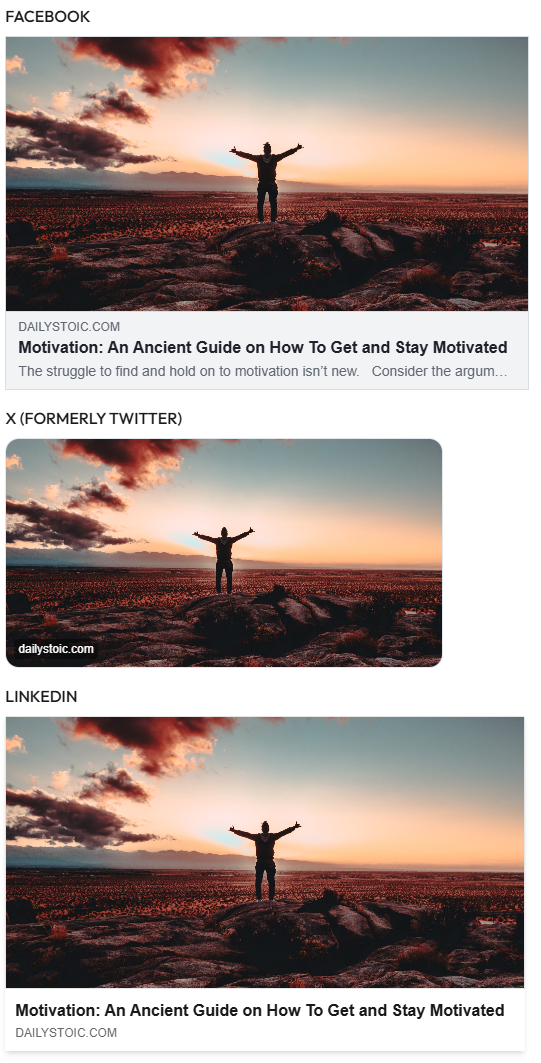
Setting Up Social Sharing Images Across Platforms
The implementation process varies significantly depending on your website platform.
WordPress Users: The easiest approach involves using featured images for blog posts and pages. Most SEO plugins like Yoast automatically use featured images as social sharing images. For more control, navigate to the social tab in your SEO plugin and upload custom images for each page.
Shopify Stores: Access your theme customization settings and upload a default social sharing image under Online Store > Themes > Customize > Theme Settings. For individual products, edit each product page and add social sharing images in the SEO section.
Squarespace Sites: Go to Settings > Marketing > Social Links and upload your default image. For individual pages, access Page Settings > SEO and add custom social sharing images.
The key principle across all platforms: set a site-wide default first, then customize specific pages where strategic.
- Set a site-wide default OG image (1200×630) that reflects your brand.
- Prioritize custom images for high-traffic and high-intent pages (home, pricing, product, top blogs).
- Verify OG and Twitter Card tags render correctly on each template.
- Clear platform caches using the preview tools below, then re-scrape.
- Re-test on mobile; assume tighter crops and smaller text rendering.
Preview Tools That Prevent Embarrassment
Before publishing content, always test how your social sharing image appears across platforms. Several tools make this process simple.
Facebook’s Sharing Debugger shows exactly how your content appears when shared on Facebook and forces cache updates when you make changes.
LinkedIn’s Post Inspector provides similar functionality for LinkedIn shares, crucial for B2B content.
For broader testing, Social Share Preview displays how your content appears across multiple platforms simultaneously.
OpenGraph.xyz offers detailed technical analysis of your page’s social metadata, helping identify issues before they impact sharing performance.
These tools also reveal when platforms cache old images. After updating a social sharing image, use these preview tools to force platforms to recognize your changes.
The Default Image Strategy
Most businesses focus on creating custom social sharing images for blog posts while ignoring their homepage, about page, and service pages. This creates inconsistent brand experiences.
Start by designing a default social sharing image that represents your brand professionally. Include your logo, primary brand colors, and perhaps your tagline. This image should look intentional: never like a generic stock photo.
Your default image serves as a fallback for pages where custom images aren’t practical or necessary. It ensures your brand appears consistently professional, even when content gets shared unexpectedly.
The best default images communicate your industry and expertise at a glance. A consulting firm might feature modern graphics with their logo. A law firm might choose more traditional design elements. A tech startup might emphasize innovation through design choices.
Keep file sizes optimized for fast loading while maintaining quality. Aim for under 300KB to prevent slow load times that could impact user experience.
Common Mistakes That Kill Engagement
The biggest mistake involves using the same image across all social platforms without considering how each platform displays content differently.
Instagram’s square format crops differently than Facebook’s horizontal layout. LinkedIn’s professional feed demands different visual approaches than Twitter’s fast-moving timeline.
Another frequent error: including too much text in social sharing images. While text can enhance clarity, many platforms compress images significantly, making small text unreadable.
Seasonal images create problems when they become outdated. That holiday-themed social sharing image from December looks unprofessional in March. Build review processes to keep images current.
Technical mistakes kill performance too. Images that don’t meet platform specifications appear poorly or not at all. Always test across devices: what looks perfect on desktop might appear completely different on mobile.
Quick fixes:
- Design for the platform’s safe area; keep faces, logos, and key text centered.
- Use minimal, high-contrast text that remains legible at small sizes.
- Avoid seasonal creative as default assets; set a quarterly review cadence.
- Export optimized files (PNG for flat graphics, high-quality JPG for photos) to keep load times snappy.
Advanced Strategies for Competitive Advantage
Smart businesses create variations of social sharing images for different audiences and campaigns. A single piece of content might have different social sharing images depending on the traffic source or campaign context. Anchor this work to your annual plan—see 2025: The Year You Finally Win at Digital Marketing.
Dynamic social sharing images based on user behavior represent the cutting edge. Some advanced setups show different images to visitors from different geographic regions or industry backgrounds.
A/B testing social sharing images reveals surprising insights about what resonates with your audience. Sometimes subtle color changes or text positioning dramatically impacts click-through rates.
Consider creating social sharing images that complement your content cluster strategy. Each piece of content within a topic cluster can have visually related social sharing images that reinforce your topical authority.
Measuring Impact and ROI
Track social sharing image performance through several metrics beyond vanity numbers. Click-through rates from social platforms to your website provide the clearest success indicator.
Google Analytics shows referral traffic from social platforms. Compare traffic volumes before and after implementing strategic social sharing images to quantify impact.
Social media management tools like Buffer or Hootsuite provide engagement metrics that reveal which social sharing images generate the most interaction.
Monitor brand mention quality too. Professional social sharing images often correlate with more positive brand mentions and higher-quality referral sources.
The ultimate measurement involves business results. Does improved social sharing image strategy lead to more qualified leads, higher conversion rates, or increased customer acquisition from social channels?
Integration with Broader Marketing Strategy
Your social sharing image strategy should align with your overall brand messaging and strategic messaging framework, plus your broader Growth Strategy Framework Essentials: Building a Foundation for Scalable Success roadmap. These images represent your brand in social feeds where first impressions matter most.
Consider how social sharing images support your SEO foundations. While not direct ranking factors, they influence user behavior patterns that search engines absolutely notice and reward.
For B2B companies, social sharing images become particularly crucial on LinkedIn, where professional credibility gets established through visual consistency and quality.
Social sharing images are low-lift, high-leverage. The setup takes hours, not weeks, yet the lift in click-throughs, brand perception, and trust compounds over time.
Here’s the unlock: a strong Social Sharing Image aligns creative with intent. When the image promises a specific outcome and the page delivers, engagement flows and rankings follow.
If you want a fast, defensible edge, audit your top pages and standardize your default assets—then pressure-test with the preview tools. If you want a partner to move faster and go deeper, contact us today.

chris
Insights on brand authority, positioning, and growth strategy from the Swift Growth Marketing team.